
How to use Momence
as a Light Centre Therapist
Below are various videos and guides on how to use your new Momence Account; from Navigating your Momence dashboard, to booking or cancelling Ad hoc rooms.
We also encourage you to read our FAQ page here
Using Momence on a Laptop/Desktop computer
How to navigate your new Momence dashboard on Laptop/Desktop
Length: 5min 19sec
A quick overview guide of your Momence dashboard, including:
- where to find your bookings,
- access to make Ad hoc bookings,
- Ad hoc Pack usage,
- see how much credit you have,
- Your general account settings:
- payment methods,
- notification settings
- and where to update your password.
How to book Ad hoc Rooms from your Momence dashboard on Laptop/Desktop
Length: 4min 55sec
A quick walkthrough of how to book rooms via the Momence dashboard. This includes:
- Where to find the booking facility,
- How to see which rooms are available at a specific time,
- How to use your Ad hoc Pack credit to book a room,
- How to pay by card instead,
- Where you can find links to purchase Ad hoc Packs.
How to cancel an Ad hoc and automatically get the credit back on your pack
Length: 1min 9sec
A quick walkthrough of how to cancel your ad hoc booking via the Momence dashboard on a Laptop/Desktop computer.
NEW: How to check your remaining Ad hoc Pack credits
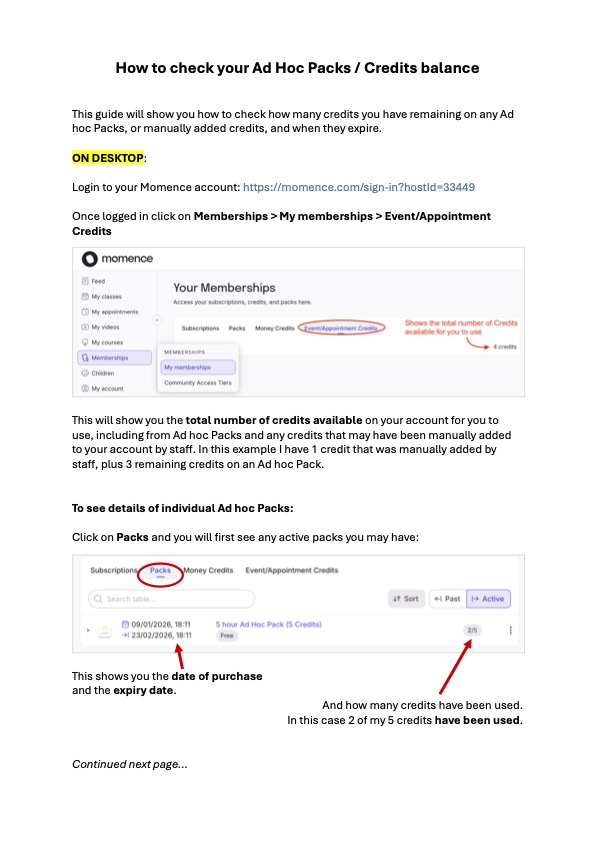
Click to see full PDF
Using the Momence App
The Momence App makes booking rooms and managing appointments easy.
Download here:


How to navigate the Momence App
Length: 4min 35sec
A general overview of your Momence App:
- where to find your bookings,
- access to make Ad hoc bookings,
- Ad hoc Pack usage,
- see how much credit you have,
- Your general account settings:
- payment methods,
- notification settings
- and where to update your password.
How to book Ad hoc Rooms using the Momence app
Length: 3min 20sec
A quick walkthrough of how to book rooms via the Momence app. This includes:
- Where to find the booking facility,
- How to see which rooms are available at a specific time,
- How to use your Ad hoc Pack credit to book a room,
- How to pay by card instead
How to cancel an Ad hoc booking using the Momence app
Length: 1min 57sec
A quick walkthrough of how to cancel a booking and get the credit back on your Ad hoc Pack.
Looking for further help?
See the Momence Support Pages here
Read our FAQ page here
Still need help?
For technical questions please reach out to Gary: gary@lightcentre.com.
For any general Therapy room hire enquiries please reach out to Amanda at therapyrooms@lightcentre.com.